This guide documents cURL techniques for authorized security testing and penetration testing. I developed this methodology while practicing on intentionally vulnerable applications (DVWA) and testing environments. This is for security professionals, bug bounty hunters, and students learning offensive security for defensive purposes.
Module 0: Setup
We will start by understanding the tool we have on hand. To do so, let's see what our curl is capable of. We will use --version.
➜  ~ curl --version
curl 8.11.1 (x86_64-redhat-linux-gnu) libcurl/8.11.1 OpenSSL/3.2.6 zlib/1.3.1.zlib-ng brotli/1.2.0 libidn2/2.3.8 libpsl/0.21.5 libssh/0.11.3/openssl/zlib nghttp2/1.64.0 OpenLDAP/2.6.10
Release-Date: 2024-12-11
Protocols: dict file ftp ftps gopher gophers http https imap imaps ipfs ipns ldap ldaps mqtt pop3 pop3s rtsp scp sftp smb smbs smtp smtps telnet tftp ws wss
Features: alt-svc AsynchDNS brotli GSS-API HSTS HTTP2 HTTPS-proxy IDN IPv6 Kerberos Largefile libz NTLM PSL SPNEGO SSL threadsafe TLS-SRP UnixSockets
As you can probably guess I'm on Fedora Linux. But that aside — what does this information give us?
-
Version. Mine is curl 8.11.1, released December 11th 2024. This matters because:
- Behavior changes between versions
- Flags appear/disappear
- TLS defaults change
When something behaves differently on another system, this is your first check.
-
Protocols. My curl supports: dict file ftp ftps gopher gophers http https imap imaps ipfs ipns ldap ldaps mqtt pop3 pop3s rtsp scp sftp smb smbs smtp smtps telnet tftp ws wss. This defines the attack surface curl can reach from this machine.
-
Features. This tells us whether a certain check will even work. For example, if we don't have the IPv6 feature then an IPv6 test is dead on arrival. We are mapping attack surface and capabilities.
Module 1: Foundations
Here we will try to fetch pages, read their headers, and if something goes wrong we will troubleshoot it.
- stdout refers to the default output stream in a computer program — the channel through which a program displays its output to the user or another program.
- stderr (Standard Error) is a stream generated by programs when they encounter an error or exceptional condition. It's basically how programs communicate error messages to users, admins, and other programs.
-
To get the page's HTML from the web server:
BASHcurl "https://httpbin.org" # HTML of the page will be printed to stdout -
We can force HTTP/1.1 and HTTP/2 and compare their differences. For deeper understanding we will use verbose mode to see how requests are being completed and at what stage a request went wrong (if it fails).
BASHcurl --http1.1 -v https://httpbin.org/ >> http1.1.txt 2>&1 # HTML saved to file curl --http2 -v https://httpbin.org/ >> http2.txt 2>&1 # 2>&1 captures both stdout and stderrHere we saved the output of each request into separate files to compare their differences.
BASH➜ Training-Camp diff http1.1.txt http2.txt # Even if body is identical, verbose logs reveal protocol negotiation, server selection, and framing differences. 214,218d213 < <!doctype html> < <html lang=en> < <title>Redirecting...</title> < <h1>Redirecting...</h1> < <p>You should be redirected automatically to the target URL: <a href="/en">/en</a>. If not, click the link. 223,225c218,220 < * IPv4: 52.55.226.129, 54.205.230.94, 98.85.201.92, 52.72.212.236, 54.158.135.159, 44.209.11.94 < * Trying 52.55.226.129:443... < * ALPN: curl offers http/1.1 --- > * IPv4: 52.72.212.236, 54.205.230.94, 52.55.226.129, 98.85.201.92, 44.209.11.94, 54.158.135.159 > * Trying 52.72.212.236:443... > * ALPN: curl offers h2,http/1.1 233c228 < { [110 bytes data] --- > { [104 bytes data] 249c244 < * ALPN: server accepted http/1.1 --- > * ALPN: server accepted h2 260,261c255,263 < * Connected to httpbin.org (52.55.226.129) port 443 < * using HTTP/1.x --- > * Connected to httpbin.org (52.72.212.236) port 443 > * using HTTP/2 > * [HTTP/2] [1] OPENED stream for https://httpbin.org/ > * [HTTP/2] [1] [:method: GET] > * [HTTP/2] [1] [:scheme: https] > * [HTTP/2] [1] [:authority: httpbin.org] > * [HTTP/2] [1] [:path: /] > * [HTTP/2] [1] [user-agent: curl/8.11.1] > * [HTTP/2] [1] [accept: */*] 263c265 < > GET / HTTP/1.1 --- > > GET / HTTP/2 267a270 > { [5 bytes data] 270,277c273,279 < < HTTP/1.1 200 OK < < Date: Sat, 03 Jan 2026 17:56:59 GMT < < Content-Type: text/html; charset=utf-8 < < Content-Length: 9593 < < Connection: keep-alive < < Server: gunicorn/19.9.0 < < Access-Control-Allow-Origin: * < < Access-Control-Allow-Credentials: true --- > < HTTP/2 200 > < date: Sat, 03 Jan 2026 17:56:41 GMT > < content-type: text/html; charset=utf-8 > < content-length: 9593 > < server: gunicorn/19.9.0 > < access-control-allow-origin: * > < access-control-allow-credentials: true 279c281 < { [5 bytes data] --- > { [8192 bytes data] 445c447 100 9593 100 9593 0 0 8745 0 0:00:01 0:00:01 --:--:-- 8752 --- 100 9593 100 9593 0 0 15028 0 --:--:-- --:--:-- --:--:-- 15036We won't dwell on what's different — but if you want to and don't know how to read
diff, check the command's manual. It won't take more than 2 minutes. -
You should already know what security headers are from our previous notes. To fetch them we use
-I.BASH➜ Training-Camp curl -I https://httpbin.org HTTP/2 200 date: Sat, 03 Jan 2026 17:51:15 GMT content-type: text/html; charset=utf-8 content-length: 9593 server: gunicorn/19.9.0 access-control-allow-origin: * access-control-allow-credentials: trueThese headers reveal what the server exposes by default and what it forgot to hide.
-
For security analysis it's usually important to know how the server reacts to both 200 OK and 404 Error responses.
BASH➜ Training-Camp curl -v https://httpbin.org >> 200.txt 2>&1 ➜ Training-Camp curl -v https://httpbin.org/noneexistingdirectory321 >> 404.txt 2>&1
Module 2: Verbose Diagnostics
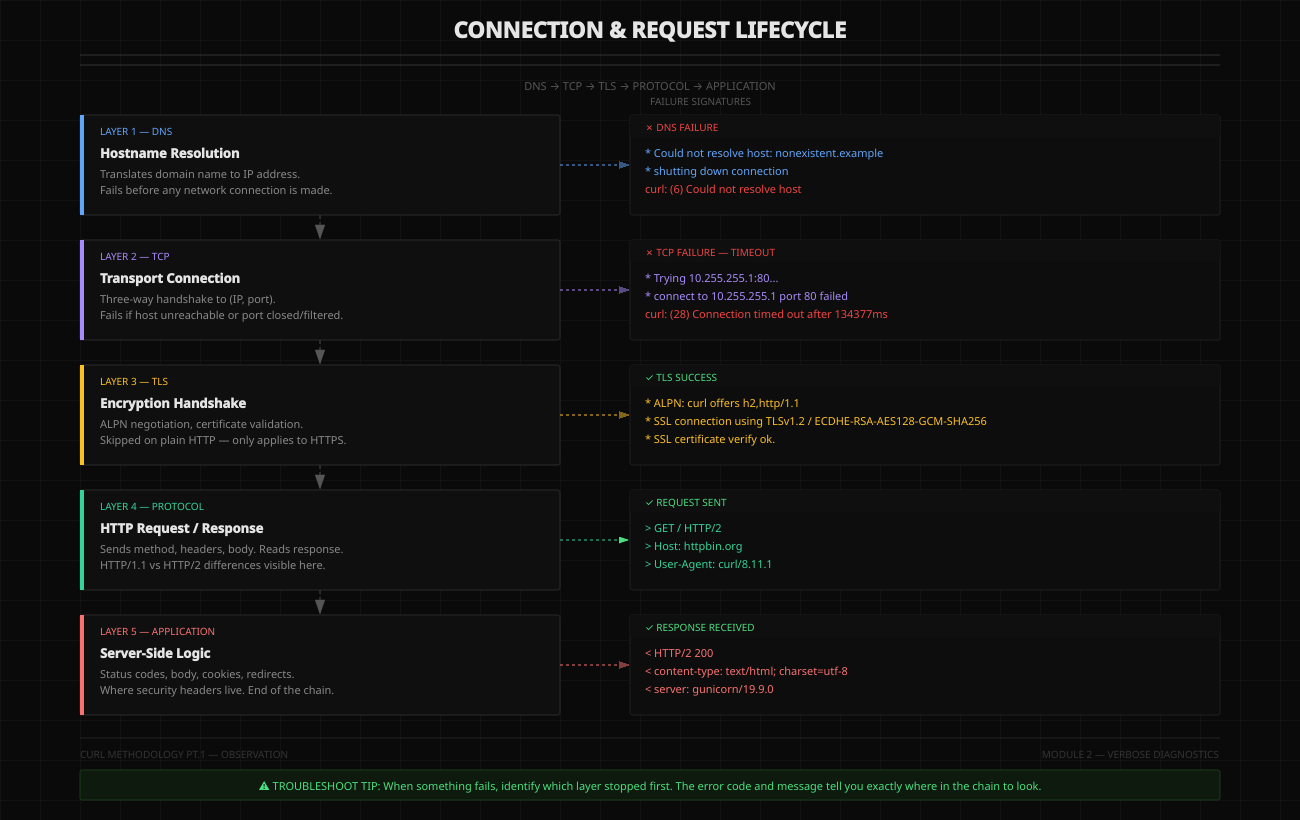
In this section we will learn to read verbose output and troubleshoot each layer of the connection and request lifecycle.
-
DNS failure.
BASH➜ Training-Camp curl -v http://nonexistent.example/ # Our operation stops immediately * Could not resolve host: nonexistent.example * shutting down connection curl: (6) Could not resolve host: nonexistent.example -
TCP timeout. For this we will use an unreachable host:
BASH➜ Training-Camp curl -v http://10.255.255.1/ # No DNS resolve needed — scanning an IP * Trying 10.255.255.1:80... # This took a couple minutes * connect to 10.255.255.1 port 80 from 192.168.15.9 port 52694 failed: Connection timed out * Failed to connect to 10.255.255.1 port 80 after 134377 ms: Could not connect to server * closing connection #0 curl: (28) Failed to connect to 10.255.255.1 port 80 after 134377 ms: Could not connect to serverAnother example — DNS resolves fine but the port is closed:
BASH➜ Training-Camp curl -v https://httpbin.org:8000/ * Host httpbin.org:8000 was resolved. # DNS resolution succeeded * IPv6: (none) * IPv4: 98.85.201.92, 44.209.11.94, 52.72.212.236, 52.55.226.129, 54.158.135.159, 54.205.230.94 * Trying 98.85.201.92:8000... * connect to 98.85.201.92 port 8000 from 192.168.15.9 port 39202 failed: Connection timed out * Trying 44.209.11.94:8000... # Will continue until every IP is checked (6 IPv4s in our case) -
Successful connection. Now let's see what a full successful connection looks like and how to read it:
BASH➜ ~ curl -v https://httpbin.org # Initial command * Host httpbin.org:443 was resolved. # DNS resolution succeeded * IPv6: (none) * IPv4: 52.72.212.236, 54.158.135.159, 98.85.201.92, 52.55.226.129, 54.205.230.94, 44.209.11.94 * Trying 52.72.212.236:443... * ALPN: curl offers h2,http/1.1 # ALPN negotiation begins after TCP succeeds, during TLS handshake * TLSv1.3 (OUT), TLS handshake, Client hello (1): # TLS handshake started * CAfile: /etc/pki/ca-trust/extracted/pem/tls-ca-bundle.pem * CApath: none * TLSv1.2 (IN), TLS handshake, Server hello (2): * TLSv1.2 (IN), TLS handshake, Certificate (11): # Mixed TLS version lines can appear due to handshake internals * TLSv1.2 (IN), TLS handshake, Server key exchange (12): * TLSv1.2 (IN), TLS handshake, Server finished (14): * TLSv1.2 (OUT), TLS handshake, Client key exchange (16): * TLSv1.2 (OUT), TLS change cipher, Change cipher spec (1): * TLSv1.2 (OUT), TLS handshake, Finished (20): # TLS handshake finished * SSL connection using TLSv1.2 / ECDHE-RSA-AES128-GCM-SHA256 / secp256r1 / rsaEncryption * ALPN: server accepted h2 # ALPN connection accepted * Server certificate: # curl shows host certificate info * subject: CN=httpbin.org * start date: Jul 20 00:00:00 2025 GMT * expire date: Aug 17 23:59:59 2026 GMT * subjectAltName: host "httpbin.org" matched certs "httpbin.org" * issuer: C=US; O=Amazon; CN=Amazon RSA 2048 M03 * SSL certificate verify ok. * Certificate level 0: Public key type RSA (2048/112 Bits/secBits), signed using sha256WithRSAEncryption * Certificate level 1: Public key type RSA (2048/112 Bits/secBits), signed using sha256WithRSAEncryption * Certificate level 2: Public key type RSA (2048/112 Bits/secBits), signed using sha256WithRSAEncryption * Connected to httpbin.org (52.72.212.236) port 443 # Connection confirmed * using HTTP/2 * [HTTP/2] [1] OPENED stream for https://httpbin.org/ # HTTP/2 stream data * [HTTP/2] [1] [:method: GET] * [HTTP/2] [1] [:scheme: https] * [HTTP/2] [1] [:authority: httpbin.org] * [HTTP/2] [1] [:path: /] * [HTTP/2] [1] [user-agent: curl/8.11.1] * [HTTP/2] [1] [accept: */*] > GET / HTTP/2 # Our request > Host: httpbin.org > User-Agent: curl/8.11.1 > Accept: */* > * Request completely sent off < HTTP/2 200 # Response headers from host < date: Sun, 04 Jan 2026 09:18:14 GMT < content-type: text/html; charset=utf-8 < content-length: 9593 < server: gunicorn/19.9.0 < access-control-allow-origin: * < access-control-allow-credentials: true < <!DOCTYPE html> # Host HTML body <html lang="en"> <head> ...
Module 3: Response Analysis
In this section I will show you how to perform response analysis on specific examples and targets.
DVWA Login
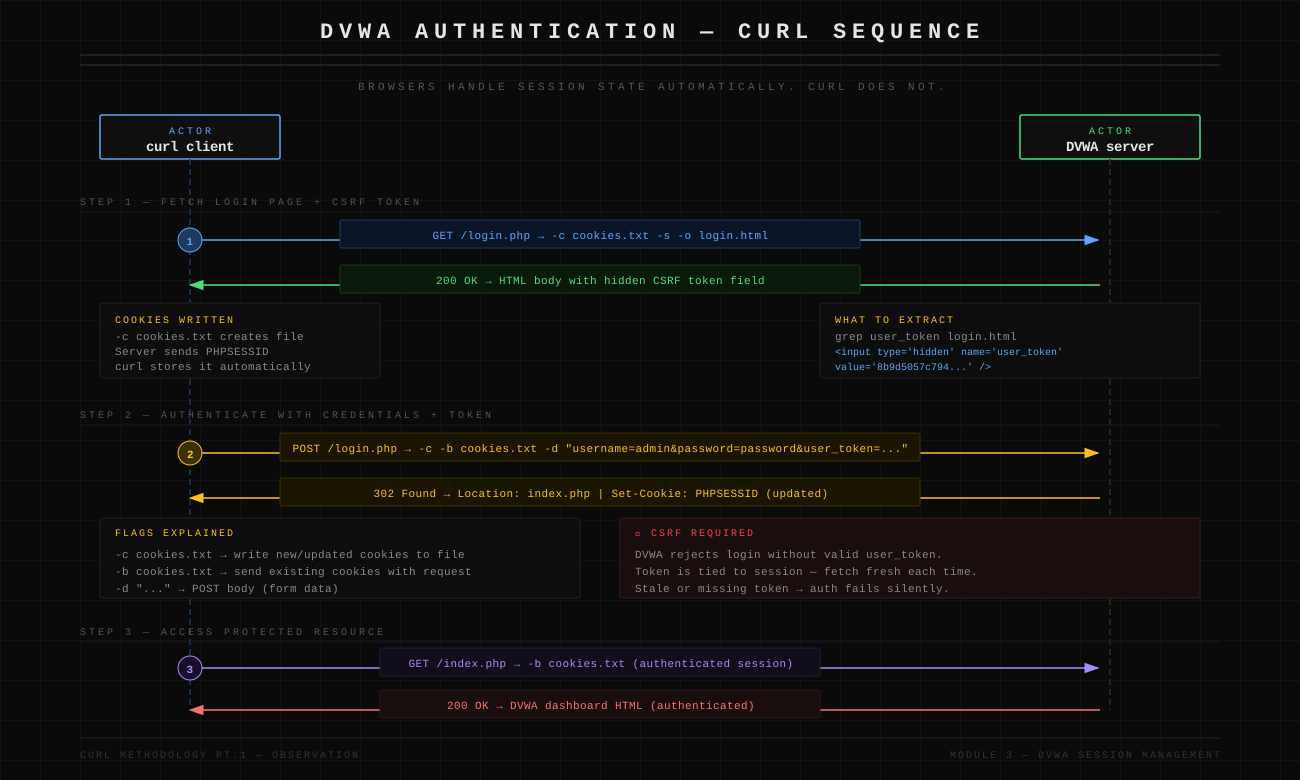
Browsers maintain session state automatically. curl doesn't. To be able to log into DVWA you have to create a cookie that curl will use to authenticate you.
-
First we fetch the login page and save it. Reading the HTML reveals that besides username and password, DVWA also has a CSRF token required for auth.
BASHcurl -c cookies.txt -s http://localhost:8081/login.php -o login.html grep user_token login.html # find the token <input type='hidden' name='user_token' value='8b9d5057c79412598b062e9aa28c93ea' /> -
Now authenticate by inserting the data into our cookie:
BASHcurl -c cookies.txt -b cookies.txt \ -d "username=admin&password=password&Login=Login&user_token=8b9d5057c79412598b062e9aa28c93ea" \ http://localhost:8081/login.php -o /dev/null -
Now we can work with curl properly using our authenticated session:
BASHcurl -b cookies.txt http://localhost:8081/index.php
Section 1: HTTP Status Codes as Behavioral Signals
Status codes tell you how the server processed your request.
200 OK — Success (or Silent Failure)
curl -I https://httpbin.org/status/200What it means: Request processed successfully — OR server failed open (dangerous).
Security implications: 200 on an authentication bypass attempt = potential vulnerability. 200 with empty/unexpected body = logic flaw. 200 when expecting 403/401 = broken access control.
Test pattern:
# Try accessing admin endpoint
curl -I https://target.com/admin
# If 200 instead of 403 → broken authz

# Try invalid input
curl -I "https://target.com/api?id=../../etc/passwd"
# If 200 instead of 400 → input validation missing
302/301 — Redirects
curl -I https://httpbin.org/redirect/1What it means: Server is sending you somewhere else. Often used for authentication flows. Can hide logic flaws.
Security implications: Redirect to login = you hit a protected resource. Redirect with Set-Cookie = session state changed. Location header content = potential open redirect.
Test pattern:
# Check where auth failure redirects
➜  ~ curl -I http://localhost:8081    # this is DVWA
HTTP/1.1 302 Found
Date: Wed, 07 Jan 2026 05:43:42 GMT
Server: Apache/2.4.25 (Debian)
Set-Cookie: PHPSESSID=cdcups8atl3ncoj2rqus7hprq5; path=/
Expires: Thu, 19 Nov 1981 08:52:00 GMT
Cache-Control: no-store, no-cache, must-revalidate
Pragma: no-cache
Set-Cookie: PHPSESSID=cdcups8atl3ncoj2rqus7hprq5; path=/
Set-Cookie: security=low
Location: login.php    # hardcoded — no redirect manipulation possible
Content-Type: text/html; charset=UTF-8
If the redirect is not hardcoded, you can try redirect manipulation:
curl -I "https://target.com/login?redirect=https://evil.com"redirect — it can also be next, url, return, dest, continue. Check all variants to be thorough.
Full redirect chain example using -L (follow redirects) with -I:
➜  Training-Camp curl -IL "https://httpbin.org/redirect-to?url=https://google.com"
HTTP/2 302                               # Server tells us it's about to redirect
date: Wed, 07 Jan 2026 08:10:16 GMT
content-type: text/html; charset=utf-8
content-length: 0
location: https://google.com
server: gunicorn/19.9.0
access-control-allow-origin: *
access-control-allow-credentials: true

HTTP/2 301                               # Redirected permanently
location: https://www.google.com/
content-type: text/html; charset=UTF-8
content-security-policy-report-only: object-src 'none';base-uri 'self';script-src 'nonce-4pKn9YTGRrE0cJGq7I5smg' 'strict-dynamic' 'report-sample' 'unsafe-eval' 'unsafe-inline' https: http:;report-uri https://csp.withgoogle.com/csp/gws/other-hp
date: Wed, 07 Jan 2026 08:10:17 GMT
expires: Fri, 06 Feb 2026 08:10:17 GMT
cache-control: public, max-age=2592000
server: gws
x-xss-protection: 0
x-frame-options: SAMEORIGIN

HTTP/2 200                               # We are at google.com
content-type: text/html; charset=ISO-8859-1
content-security-policy-report-only: object-src 'none';base-uri 'self';script-src 'nonce-ZdfTfpwWPExEIzghCDuBXg' 'strict-dynamic' 'report-sample' 'unsafe-eval' 'unsafe-inline' https: http:;report-uri https://csp.withgoogle.com/csp/gws/other-hp
date: Wed, 07 Jan 2026 08:10:17 GMT
server: gws
x-xss-protection: 0
x-frame-options: SAMEORIGIN
cache-control: private
set-cookie: AEC=AaJma5ukZwNRv-5N7SWv3ZJkvrZP10c4fZIiIx9Pi3FN778Q1MRyvQ1yQw; expires=Mon, 06-Jul-2026 08:10:17 GMT; path=/; domain=.google.com; Secure; HttpOnly; SameSite=lax
401 vs 403 — Authentication vs Authorization
curl -I "https://httpbin.org/status/401"
HTTP/2 401
date: Wed, 07 Jan 2026 07:53:26 GMT
content-length: 0
server: gunicorn/19.9.0
www-authenticate: Basic realm="Fake Realm"
access-control-allow-origin: *
access-control-allow-credentials: true

curl -I "https://httpbin.org/status/403"
HTTP/2 403
date: Wed, 07 Jan 2026 07:52:55 GMT
content-type: text/html; charset=utf-8
content-length: 0
server: gunicorn/19.9.0
access-control-allow-origin: *
access-control-allow-credentials: true
What they mean: 401 = "I don't know who you are" (authentication failure). 403 = "I know who you are, but you can't do this" (authorization failure).
Security implications: 401 → add authentication, might work. 403 → you're authenticated but lack permission (IDOR testing target). 403 on one method, try another (GET → POST → PUT).
Test pattern:
# No auth
curl -I https://target.com/api/users/123
# Response: 401

# With auth
curl -I -H "Authorization: Bearer TOKEN" https://target.com/api/users/123
# Response: 403 → authorization check exists, test for IDOR

# Try different user ID
curl -I -H "Authorization: Bearer TOKEN" https://target.com/api/users/456
# Response: 200 → IDOR vulnerability found
400 — Bad Request
curl -I "https://httpbin.org/status/400"What it means: Server rejected your input early. Input validation triggered.
Security implications: 400 = validation exists (good). But what validation? Try variations. Does it validate everything or just some fields?
Test pattern:
# Malformed JSON
curl -X POST -d "not-json" https://target.com/api

# Missing required field
curl -X POST -d '{"username":"test"}' https://target.com/api

# Type mismatch
curl -X POST -d '{"age":"not-a-number"}' https://target.com/api
500 — Internal Server Error
curl -I https://httpbin.org/status/500
HTTP/2 500
date: Wed, 07 Jan 2026 08:23:01 GMT
content-type: text/html; charset=utf-8
content-length: 0
server: gunicorn/19.9.0
access-control-allow-origin: *
access-control-allow-credentials: true
What it means: You broke something. Backend exception occurred. This is valuable.
Security implications: Input reached backend logic. Potential injection point. The error might leak information.
Test pattern:
# SQL injection attempt
curl "https://target.com/search?q=test'"
# Response: 500 → query reached database

# Path traversal
curl "https://target.com/file?path=../../../../etc/passwd"
# Response: 500 → file operation attempted

# Check response body for stack traces
curl -v "https://target.com/search?q=test'" 2>&1 | grep -i "error\|exception\|stack"
Section 2: Security Headers Audit
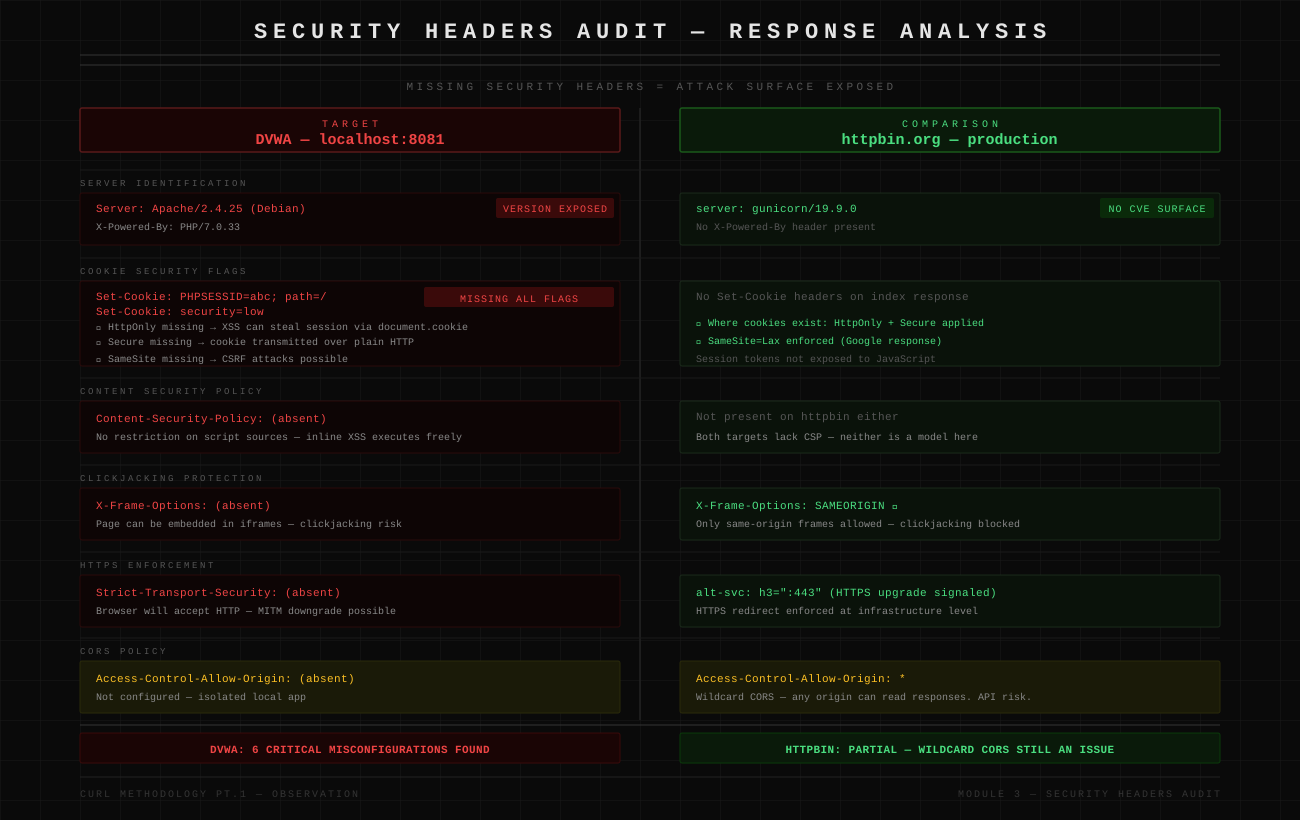
Missing security headers = attack surface exposed.
Testing DVWA:
➜  ~ curl -I http://localhost:8081
Server: Apache/2.4.25 (Debian)
X-Powered-By: PHP/7.0.33
Set-Cookie: PHPSESSID=abc; path=/
Set-Cookie: security=low
Security issues found:
Server: Apache/2.4.25→ Version disclosed (search for CVEs)X-Powered-By: PHP/7.0.33→ Old PHP version (likely vulnerable)- Cookie missing
HttpOnly→ XSS can steal session - Cookie missing
Secure→ Can be sent over HTTP - Cookie missing
SameSite→ CSRF vulnerable - No
Content-Security-Policy→ XSS protection missing - No
X-Frame-Options→ Clickjacking possible - No
Strict-Transport-Security→ HTTPS not enforced
Compare with httpbin (better configured):
➜  ~ curl -I https://httpbin.org
server: gunicorn/19.9.0
access-control-allow-origin: *
access-control-allow-credentials: true
Still shows server software, but no version number leaking detailed CVE info.
What to look for:
Server/X-Powered-Byheaders → Information disclosureSet-Cookieflags → Session securityCSP/X-Frame-Options/HSTS→ Missing protections
Section 3: Response Timing Patterns
Timing reveals backend behavior.
Basic timing measurement:
# Create timing template
cat > curl-timing.txt << EOF
time_total: %{time_total}s\n
EOF

# Test endpoint
curl -w "@curl-timing.txt" -o /dev/null -s https://httpbin.org/delay/2
# Output: time_total: 2.1s
What timing tells you:
Fast response (< 100ms): Input rejected early. Validation before backend logic. Good for security.
Slow response (> 2s): Backend processing occurred. Database query executed. Potential for timing-based attacks.
Testing DVWA:
# Normal SQLi request
time curl -b cookies.txt \
  "http://localhost:8081/vulnerabilities/sqli/?id=1&Submit=Submit"

# With SLEEP injection (tests blind SQLi)
time curl -b cookies.txt \
  "http://localhost:8081/vulnerabilities/sqli_blind/?id=1' AND SLEEP(5)--&Submit=Submit"
# If this takes 5+ seconds longer → SQLi confirmed
Pattern: If you can control response time, you can extract data blindly.
Section 4: Error Message Analysis
Errors leak implementation details.
Testing SQL errors in DVWA:
➜  ~ curl -b cookies.txt \
  "http://localhost:8081/vulnerabilities/sqli/?id=1'&Submit=Submit"

# Response body contains:
# "You have an error in your SQL syntax; check the manual that
# corresponds to your MySQL server version for the right syntax
# to use near ''1''' at line 1"
What this reveals: Database type is MySQL. Query structure leaked. Input reaches the SQL query directly. SQL injection confirmed.
Testing file inclusion errors:
➜  ~ curl -b cookies.txt \
  "http://localhost:8081/vulnerabilities/fi/?page=/etc/passwd"

# Response might contain:
# "Warning: include(/etc/passwd): failed to open stream"
What this reveals: Absolute paths in error messages. File system structure exposed. File inclusion vulnerability confirmed.
What to grep for:
curl http://target.com/test | grep -i "error\|warning\|exception\|fatal\|mysql\|postgresql\|syntax"Conclusion
What we covered in this part:
- Reading verbose output to troubleshoot connections
- Interpreting status codes for security implications
- Auditing headers for missing protections
- Recognizing error messages that leak information
- Understanding session state management
You can now observe and analyze server behavior with curl. Part 2 will teach you to actively exploit what you observe.