
Burp Suite is a core offensive security platform used for manual web application testing. Here I will document Burp from a red team perspective, focusing on request analysis, attack surface discovery, and exploit development rather than automated scanning. For our target we will use DVWA (Damn Vulnerable Web Application). Check the official repository if you're interested — github.com/digininja/DVWA.
Intercepting a Request
We will use Burp Proxy to intercept requests. Burp Proxy allows interception and modification of HTTP requests in transit, enabling visibility into parameters, headers, cookies, and server trust assumptions.
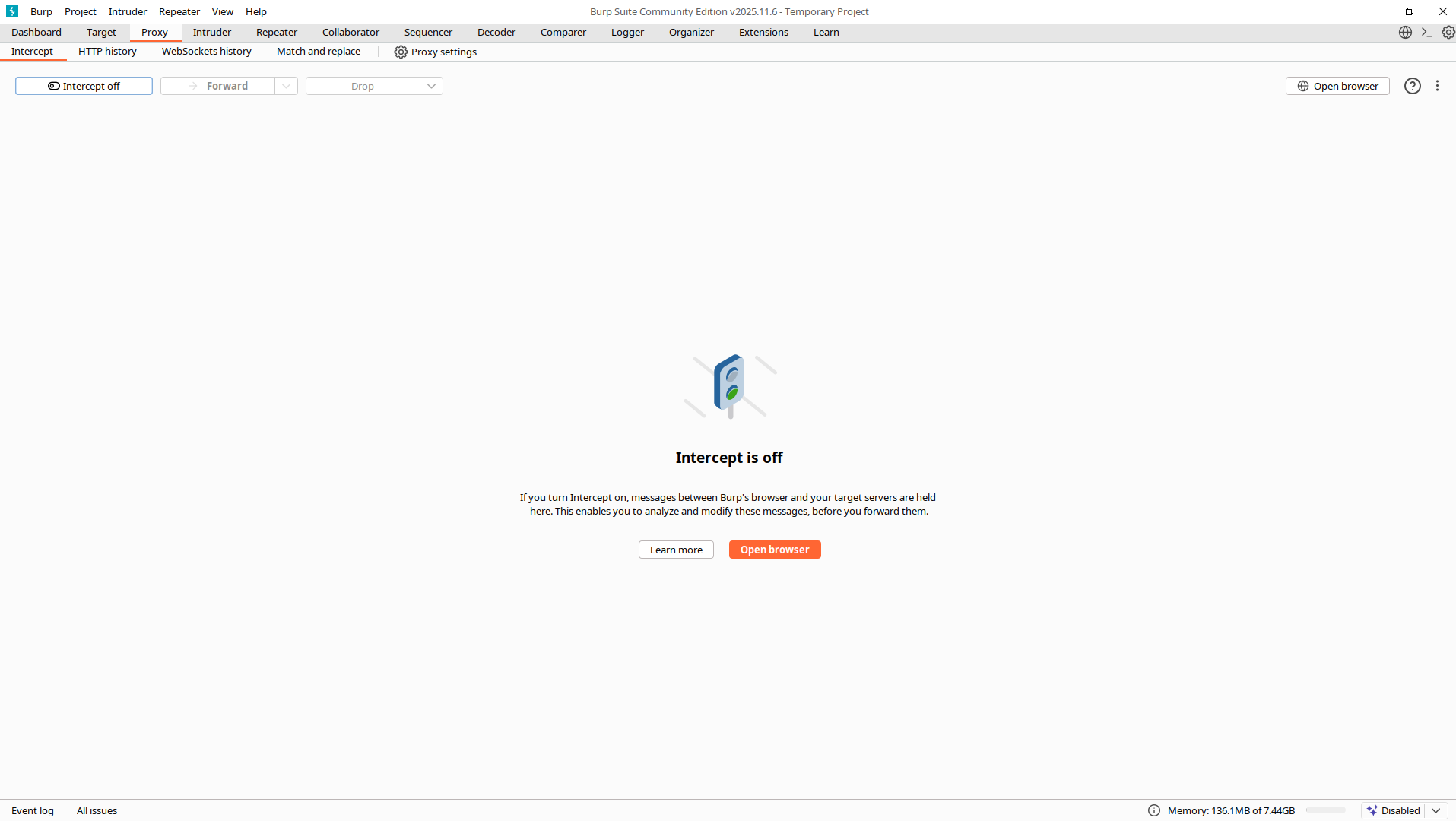
Click the Proxy tab then turn on the intercept. You will see the middle panel say "Intercept is on". Now every request performed by Burp's browser will be shown here. Click "Open Browser" to open Chromium — Burp Suite's built-in browser, preconfigured to work with Burp Suite.
When we send an HTTP request, Burp Suite will intercept it so the page won't load, and we can study the request.
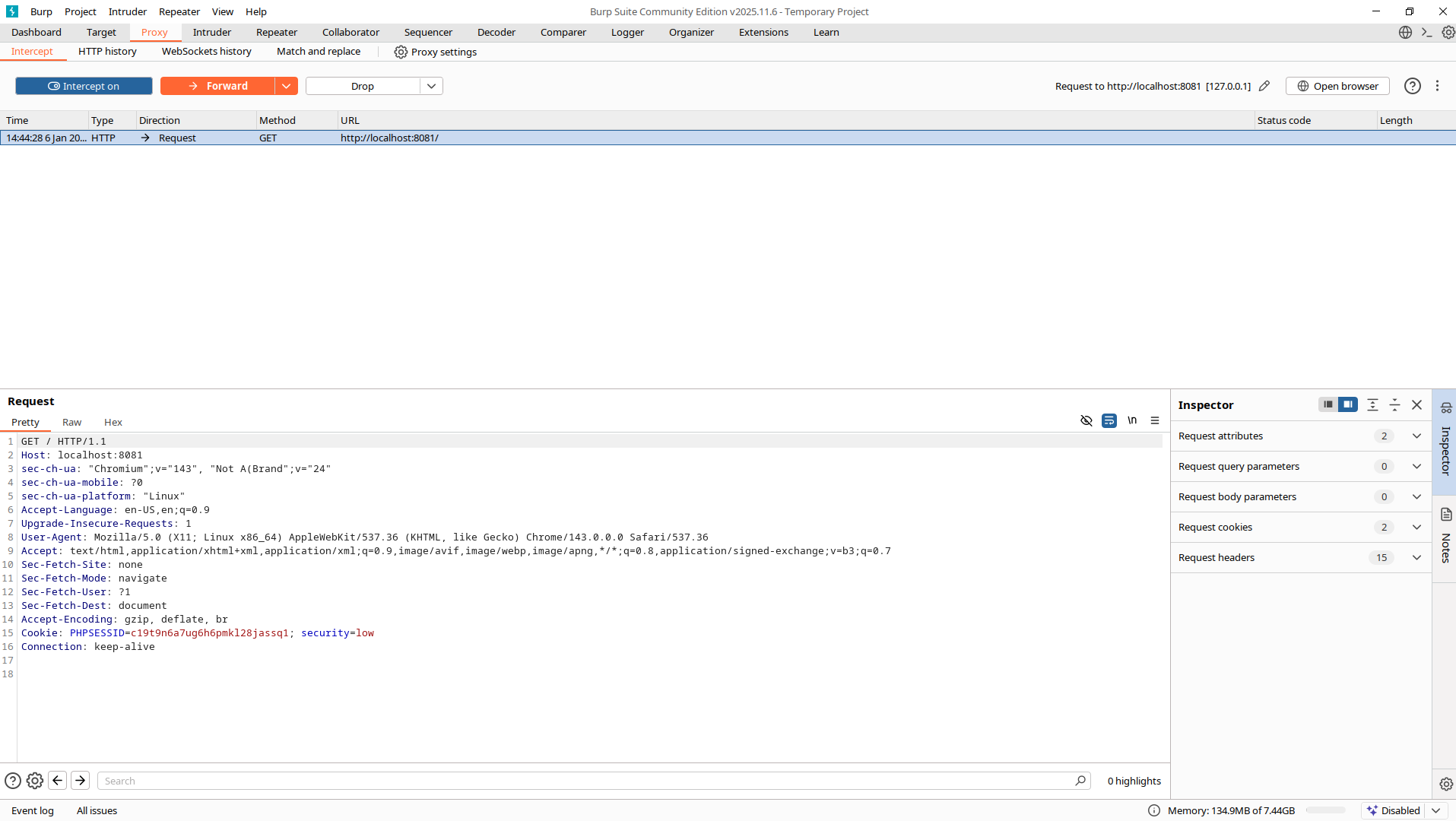
Now we can study the request and even modify it. Currently it's in Pretty mode, but Raw and Hex versions are also available. To let the request reach the server, click Forward. You won't need to intercept every request, so turn it off when you don't need it. Next to the Intercept tab there's also an HTTP History tab for reviewing requests and responses you've already made.
What browsers hide. When you click "login" in a browser, this happens invisibly:
- JavaScript may modify your input
- Hidden fields are added
- Headers are automatically set
- Request is sent
You never see:
- What data is actually being sent
- Which fields are validated client-side only
- What the server actually receives
Burp reveals this:
POST /login.php HTTP/1.1
Host: localhost:8081
Content-Type: application/x-www-form-urlencoded

username=admin&password=password&user_token=abc123&Login=Login
Security implications:
user_tokenis a CSRF token — can we bypass it?Login=Loginis a hidden field — is it validated?- Client-side JavaScript might reject input — does the server also check?
Attack surface questions:
- What happens if I remove
user_token? - What if I change
Loginto something else? - What if I add extra parameters?
Modifying HTTP Requests with Burp Proxy
Now we will manipulate these requests in ways the website isn't expecting, in order to see how it responds. In this write-up we will focus on understanding the topic and developing a Red Team mindset.
Go back to http://localhost:8081/login.php and turn intercept on. Now click login again.
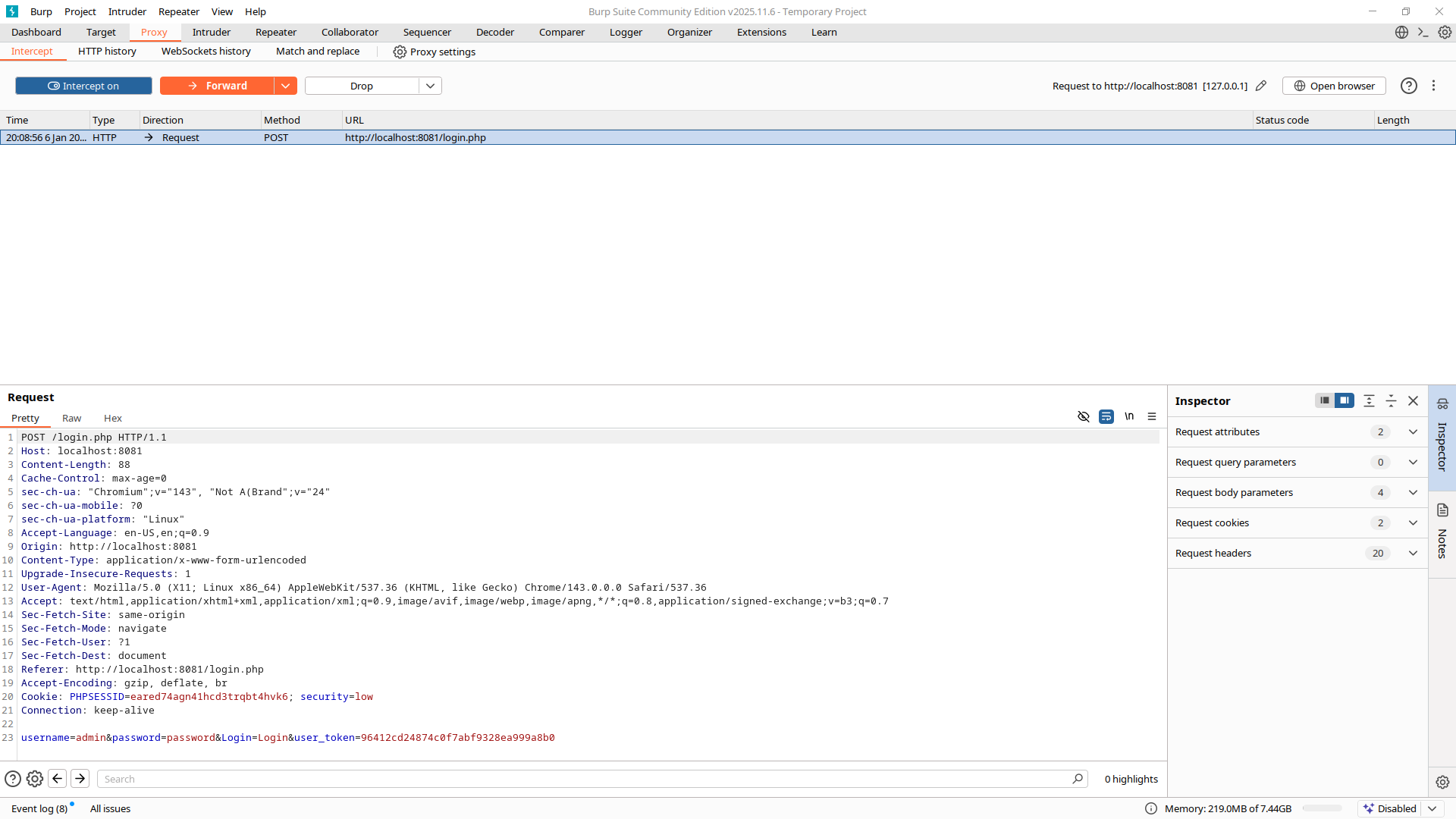
Using the previously identified login request, we now manipulate parameters to observe backend validation behavior. After doing so go to HTTP History and pick your request to see information about it and the response. Don't forget to switch "Original request" to "Edited request" to look at the right thing.
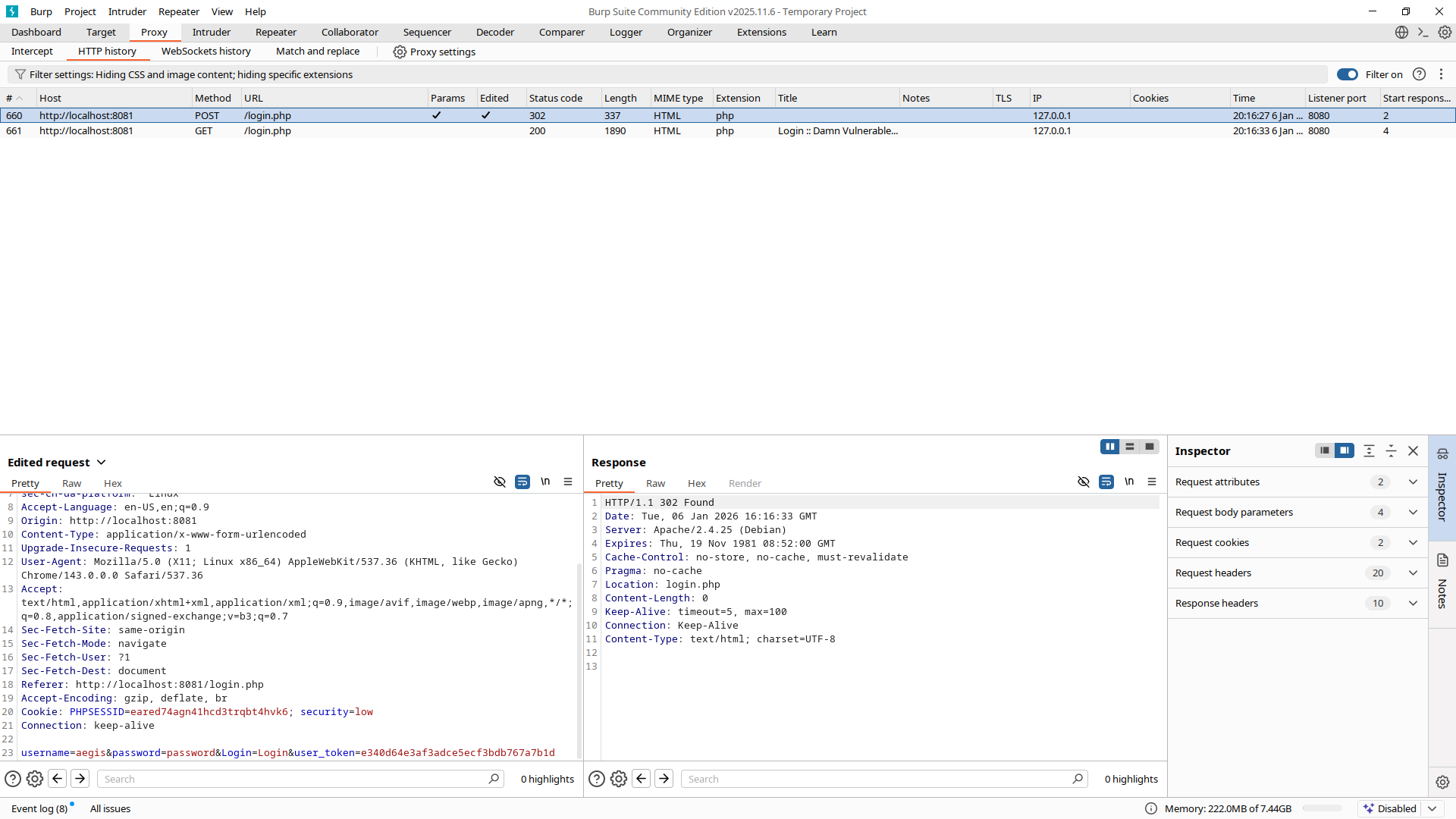
When we change the username or password to a wrong one we receive code 302, which redirects us back to the login page. If we also change the user_token we will see that the original body of the login page has changed — it now contains the following:
<div class="message">CSRF token is incorrect</div>This confirms that DVWA enforces CSRF protection on the login endpoint and validates the token before credential processing. Authentication failure and CSRF failure are handled as separate conditions, each producing distinct server responses. Now you know how to modify requests in Burp Suite.
Reissue Requests with Burp Repeater
In this section we will use Burp Repeater to send an interesting request over and over again. This allows us to study server responses to different input without having to use intercept for every single request. We will dissect the DVWA login page to determine exactly how the CSRF token works in that application.
Step 1: Identify an Interesting Request
An interesting request can be anything depending on the application — sometimes it's a GET /product request with a productId query parameter, sometimes it's related to login. For us, the interesting request is the POST request the client sends to the server to log into the application.
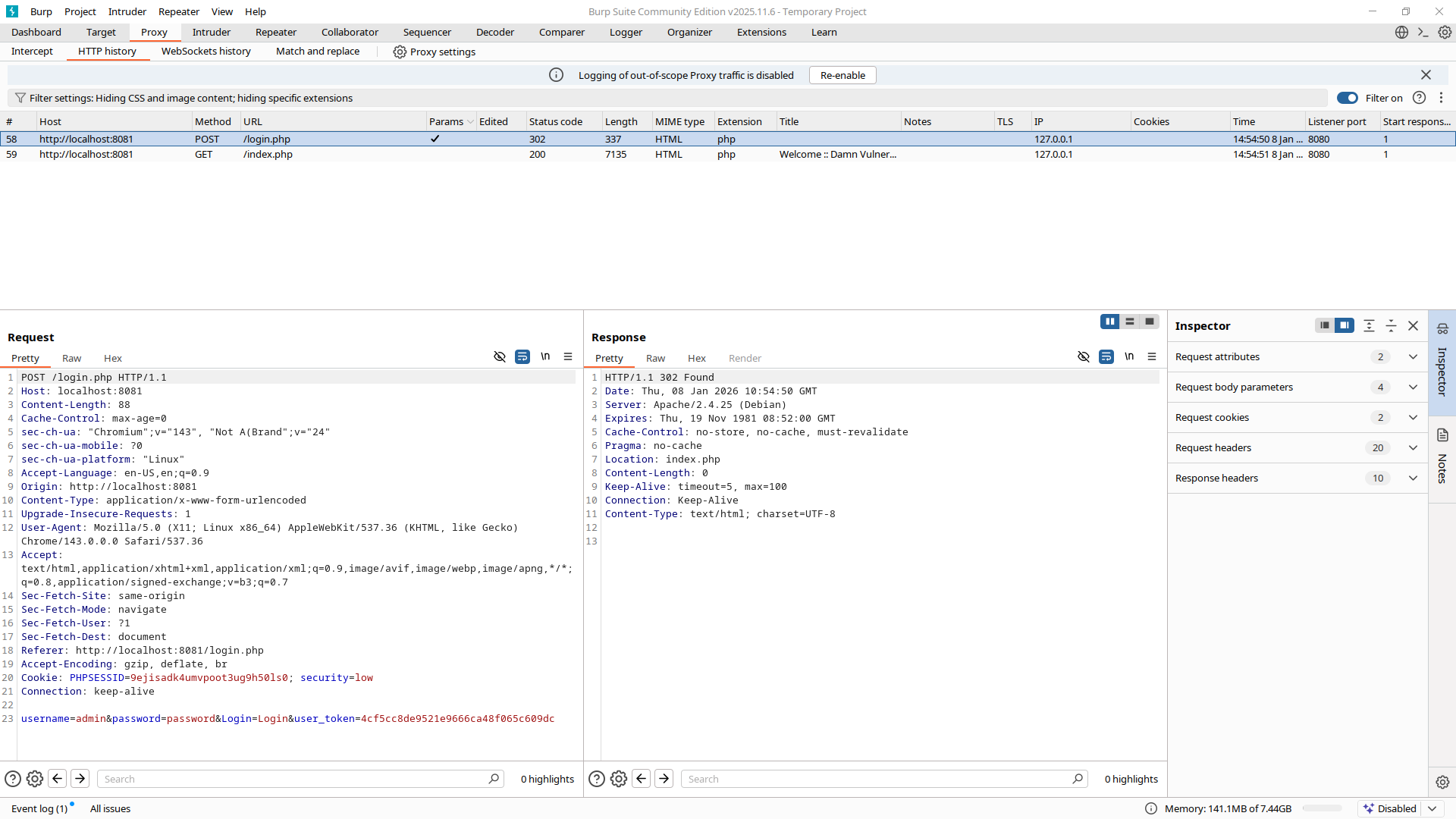
Right-click on it and click "Send to Repeater". The Repeater tab will light up — your request is now there.
Step 2: Understand How Repeater Works
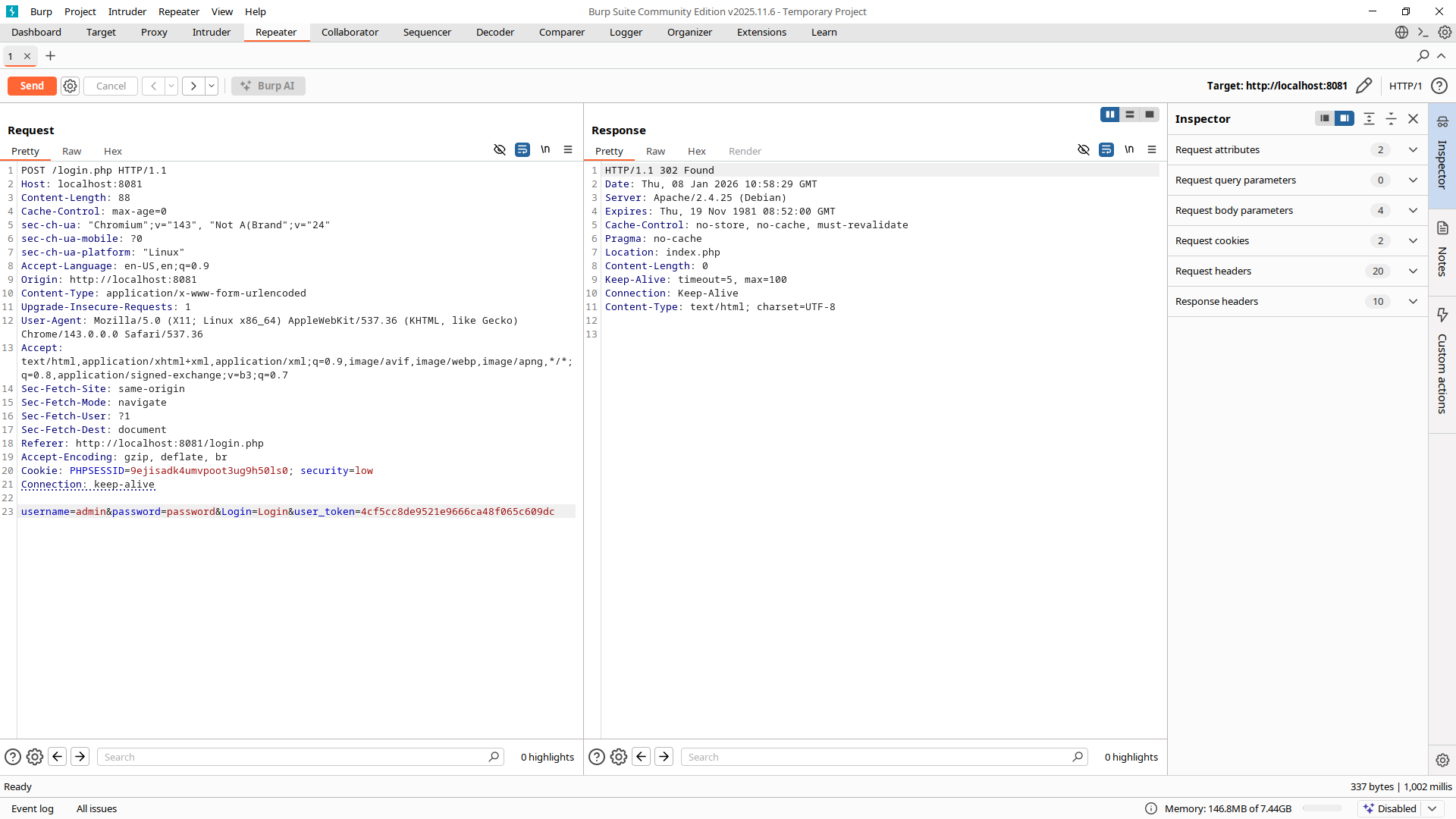
Send the original version — it will respond with status 302, meaning we're being redirected. A "Follow redirection" button will appear next to the Send button. Click it. The response confirms we're now at index.php, the DVWA home:
HTTP/1.1 200 OK
Date: Thu, 08 Jan 2026 11:02:52 GMT
Server: Apache/2.4.25 (Debian)
Expires: Tue, 23 Jun 2009 12:00:00 GMT
Cache-Control: no-cache, must-revalidate
Pragma: no-cache
Vary: Accept-Encoding
Content-Length: 6864
Keep-Alive: timeout=5, max=100
Connection: Keep-Alive
Content-Type: text/html;charset=utf-8


<!DOCTYPE html PUBLIC "-//W3C//DTD XHTML 1.0 Strict//EN" "http://www.w3.org/TR/xhtml1/DTD/xhtml1-strict.dtd">

<html xmlns="http://www.w3.org/1999/xhtml">

    <head>
        <meta http-equiv="Content-Type" content="text/html; charset=UTF-8" />
        <title>Welcome :: Damn Vulnerable Web Application (DVWA) v1.10 *Development*</title>
        <link rel="stylesheet" type="text/css" href="dvwa/css/main.css" />
        <link rel="icon" type="image/ico" href="favicon.ico" />
        <script type="text/javascript" src="dvwa/js/dvwaPage.js"></script>
    </head>

    <body class="home">
    ...
Now we can resend this request as many times as we like and the response will be fresh every time. Click the < button next to Send to go back to the original request, since it changed during the redirection and session/cookie assignment.
Step 3: Modify the Request in Repeater
Finally we will edit the request to try different case scenarios and understand how the server handles CSRF tokens.
-
Case 1 — Missing token. Edit the request to remove
user_tokenentirely and hit Send → Follow redirect. We still receive status 302, BUT this time we're sent back to/login.phpwith the response body containing<div class="message">CSRF token is incorrect</div>. -
Case 2 — Wrong token. After sending a wrong token we receive the exact same response. Also interesting: the response body contains a different CSRF token from the original one (this happens every time). If we try that new token we still receive the incorrect token message. Interesting.
-
Case 3 — Malformed token.
-
What if we send not just a wrong token but a truly malformed one? Using Chinese, Arabic, Cyrillic letters and non-ASCII symbols. In Burp those symbols will appear as rectangles or "?" — that's not an error on your side, Burp simply can't render them due to missing fonts. The server response remains unchanged, indicating CSRF validation is not influenced by character encoding or token format.
-
Browsers default to UTF-8 and the server expects it — but it's not always enforced. What if we change the encoding? Let's lie in the header and resend our malformed request:
HTTPContent-Type: application/x-www-form-urlencoded; charset=ISO-8859-1The key parts of the response:
HTTPHTTP/1.1 200 OK Date: Thu, 08 Jan 2026 11:28:37 GMT Server: Apache/2.4.25 (Debian) Expires: Tue, 23 Jun 2009 12:00:00 GMT Cache-Control: no-cache, must-revalidate Pragma: no-cache Vary: Accept-Encoding Content-Length: 1735 Keep-Alive: timeout=5, max=100 Connection: Keep-Alive Content-Type: text/html;charset=utf-8 <!-- Server enforces UTF-8 --> <!DOCTYPE html PUBLIC "-//W3C//DTD XHTML 1.0 Strict//EN" "http://www.w3.org/TR/xhtml1/DTD/xhtml1-strict.dtd"> <html xmlns="http://www.w3.org/1999/xhtml"> ... <div class="message">You have logged in as 'admin'</div> <div class="message">You have logged in as 'admin'</div> <div class="message">CSRF token is incorrect</div> <div class="message">CSRF token is incorrect</div> ... </html>Although the application does not redirect to the authenticated area, the presence of the "You have logged in as admin" message confirms that authentication logic executed successfully and a session was established. This means: Authentication happens before CSRF token validation. But why do we receive each message twice? This is the result of sloppiness in the "low" difficulty setting. The application processes authentication and CSRF validation without enforcing a strict execution order or terminating request processing on failure. As a result, both success and failure messages are generated and rendered multiple times within a single response.
-
Now let's check whether the server has proper input-handling — we will poke the server's decoding to see if it has holes of its own. This is Raw Binary Abuse. In Repeater, switch the presentation from "Pretty" to "Raw" before editing. Note that this technique works best against backends with C/C++ extensions, legacy libraries, or mixed language stacks. That's not DVWA's case here, but the technique remains valid for other applications.
-
Null Byte injection. Tests whether the backend treats
%00as a string terminator. Try:user_token=abc%00def. The response body contains two "CSRF token is incorrect" messages again — no auth this time. -
Invalid UTF-8 sequences. Can sometimes crash a really bad parser. Try:
user_token=%C0%AF. No interesting response received. -
Control characters. ASCII control characters are still ASCII, just different. Try:
user_token=abc%0D%0Adef. This is CRLF — Carriage Return (\r, ASCII 13) and Line Feed (\n, ASCII 10), used to note line termination. Response is the same. -
Size mismatch. Lie about the content size — set the
Content-Lengthheader to1. Note: this is more effective with raw sockets; Burp Suite won't let us fully desync HTTP easily. Response is a double "CSRF token is incorrect" message.
-
-
Observations Summary:
- CSRF token presence and value are validated, but validation does not block authentication logic.
- Character encoding manipulation does not influence CSRF validation.
- Malformed, binary, and control-character input is normalized before validation.
- No decoding or parsing vulnerabilities were identified.
- Authentication executes prior to CSRF enforcement on low security configuration.
Conclusion and Tips
These were specific examples, but there are unwritten rules when we analyse server behavior through HTTP requests:
-
HTTP status code. These are crucial for understanding backend logic.
- 200 → action likely succeeded, or the app failed open
- 302 / 301 → redirect, often auth or validation failure
- 401 / 403 → access control triggered
- 400 → input rejected early
- 500 → you broke backend logic (valuable)
-
Response body differences. You don't need to read the whole response.
- New error message?
- Different HTML block?
- Debug output?
- Same page but different content?
Example we already saw: invalid CSRF → explicit CSRF error. Invalid credentials → generic login failure.
-
Authentication state changes. After forwarding a modified request, ask:
- Am I still logged in?
- Was I logged out?
- Did my role change?
- Did access persist?
-
Headers.
Set-Cookiecan appear in failed auth responses too. Pay attention to:- Is it a NEW session token? (auth succeeded)
- Is it the SAME token? (auth failed, session persisted)
- Is the token DELETED? (session terminated)
Other headers can give interesting information too.
-
What the server ignores. Sometimes nothing can be more useful than something.
- Duplicate parameters (which one wins?)
- Case sensitivity in parameter names
- Content-Type manipulation (JSON → form-data → XML)
- HTTP verb changes (POST → PUT → PATCH)
Using these observations you can build a mental security map. Use this structure mentally or make your own:
- Entry points: Login, Settings, Forms, API endpoints — anything that changes state.
-
For each entry point, answer 4 questions:
- What controls access? Session cookie, Token, Role, or Nothing?
- What validation exists? CSRF, Input length, Method check, Client-side only?
- What happens if input lies? Silent fail, Explicit error, or Partial success?
- What does the server trust by default? This is the crucial one.
In the next Burp Suite Methodology write-ups we will focus on more offensive techniques.